
When should an ALS victim stop trying to walk? Many caregivers and ALS victims have posted on the Facebook group I belong to (ALS – Patient and Caregiver tips for every day living) about walking difficulties, falling, and breaking bones. The ALS victims want to be independent, and not yield to needing assistance, but gravity is their worst enemy. It is difficult for many people to give up walking, and it’s also hard to admit a wheelchair is necessary.
However, after your first fall, don’t try to walk unassisted anymore!!!! Remember: Corners are sharp and floors are hard!!! From all the problems our son went through, I early began advocating for long-term solutions to problems. Crutches and walkers are short-term solutions to a progressive disease, meaning these devices, among others I’ve discussed on this website, will only be good for a while, and then the user will have to get a better device.
Forearm crutches
Forget canes and forearm crutches (see photo below). You need assistive devices that are steadier than these. Our son, who died from ALS in October 2021, wrote in his book “Never Say Invisible” (https://www.amazon.com/Never-Say-Invisible-Memoir-Living-ebook/dp/B0B4265SFZ) about his experiences before he got a wheelchair. There was the time in late in 2018 he tried to enter a restroom attached to a hotel lobby when he was still on forearm crutches like the ones in the photo below. Because the hotel didn’t have a button to push to open the door, he had to use one of his crutches to prop open the restroom door while he managed to enter. Once he was inside, he didn’t know the floor was slippery until it was too late. One of his crutches slid out from under him. As he was falling, he hit his head on a urinal and ended up on his back, bleeding from a head wound. Even though his fingers were already curled from ALS, he was able to work his cell phone out of his pants pocket with his ALS-crippled hands and call his friends in the lobby. After helping him up, some of the friends ran out to a nearby store and bought him a folding push wheelchair.

There are many links to forearm crutches on the web; for example, the ones above are at: https://www.avacaremedical.com/guardian-forearm-crutches.
Our son moved into our house in mid-2018 after his lovely wife told him she didn’t want to care for him. In our house, there were two sets of stairs he had to go up and down daily to get to and from his bedroom, the bathroom, the kitchen, and also to leave the house. He struggled to use the stairs on forearm crutches. I had to hover over him whenever he had to go up or down the stairs to try to catch him if he lost his balance. Before I began hovering over him, he fell twice in his cramped bathroom and damaged the walls both times. Even though his head hit the floor both times, he was OK. My wife and I heard crashes both times and found him lying on the floor stunned.
Walkers
If you are unwilling to get a wheelchair, at least try a walker: it’s steadier than forearm crutches, but with ALS, it’s still a short-term solution. There are many styles and options: some have four feet, two or four wheels, adjustable heights, handbrakes, trays or baskets, ones that fold, ones with seats, wide ones, narrow ones, forearm rests, etc. However, if your grip weakens, as our son’s did, you won’t be able to hold on well and you may still fall. I noticed that our son was not actually gripping the handgrips of his walker, because ALS had already destroyed his ability to hold onto everything. He was only parking or resting his hands there to support his weight. Also, I noticed that his wrists kept sagging inwards on the handles under his own weight while leaning forward. (See my own hand modelling what was happening to our son’s grip in the photo below).
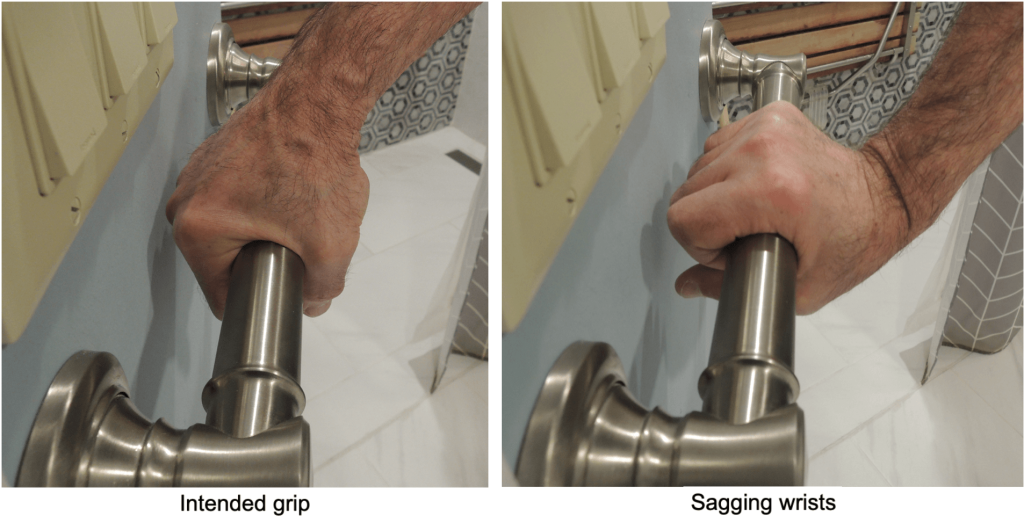
At least his wrists never collapsed. (I noticed this same problem whenever he was at a urinal or toilet at a highway rest stop or restaurant. Since I always stood behind him in the restroom, I first straightened his wrists, then I placed my hands on top of his to keep his hands on the walker or handrails and prevented them from sagging inwards again.)
Stair lifts (stair glides)

https://www.acornstairlifts.com/stairlift/stairlift-straight-staircase
Because our son had two sets of 6-step stairs to negotiate, we needed 3 walkers (all donated to him), and we also had two push wheelchairs (one bought by friends and one donated). (See diagram below). We needed walkers on all 3 floors so we didn’t have to carry one up and down the stairs to the next level. The two sets of stairs were not close to one another where they met at the main floor, so our son had to dismount the lower stair lift, use a walker to move to the upper stair lift, then sit on it, then go up to the top floor. From there, once he began struggling to use his walker to get to his bedroom or bathroom, we switched to his second wheelchair.
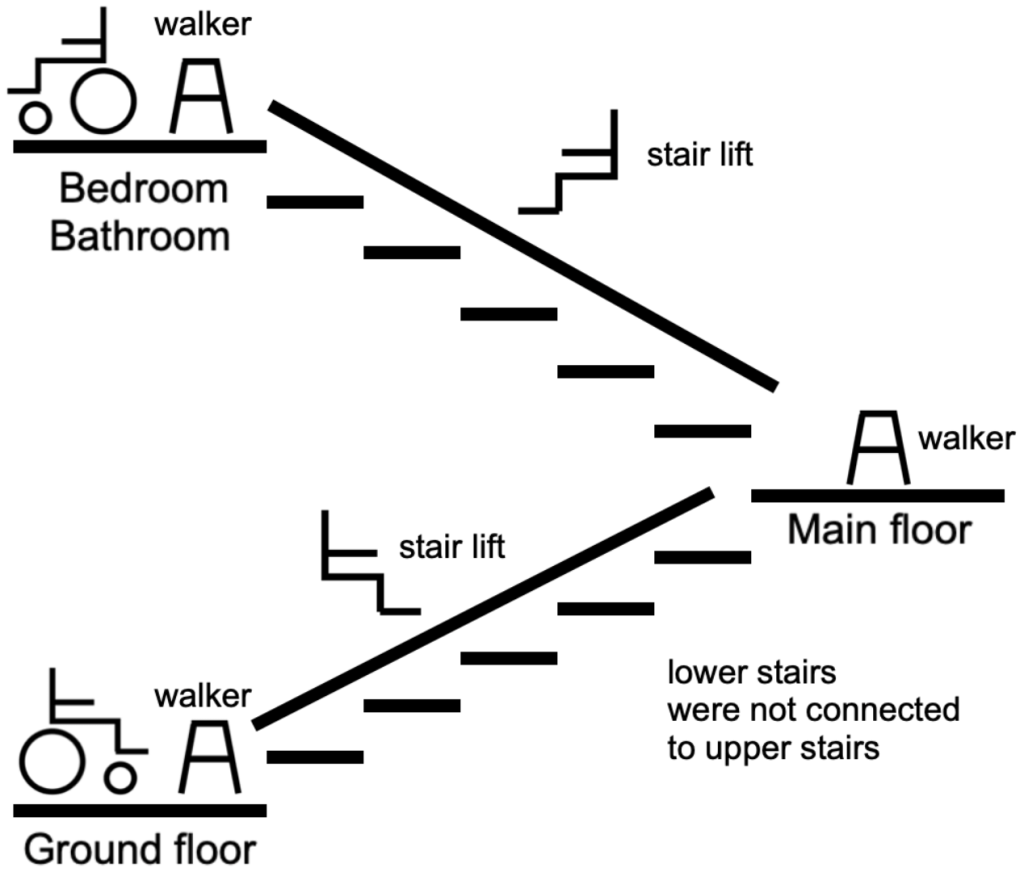
Because of the design of our house, we had to rent two stair lifts (like the one in the photo above). We did not have an accessible wing added onto our house yet, so our son had to navigate multiple levels every day as explained above. The lifts had backup batteries in case of power failures. The seats and arms folded up when they weren’t in use. Our son used these for a while, but when spasticity became a problem, he would stiffen up and become straight like a plank of wood and start to slide off the seat. I once counted at least 20 transfers to get our son out of our car in our driveway, into his push wheelchair, then into the house, up two stair lifts while using 3 walkers, and into bed. After our son passed away, the stair lift company took back the two lifts but gave us only pennies on the dollar, even though I know they recondition the lifts and re-rent them.
Powered stairclimbers
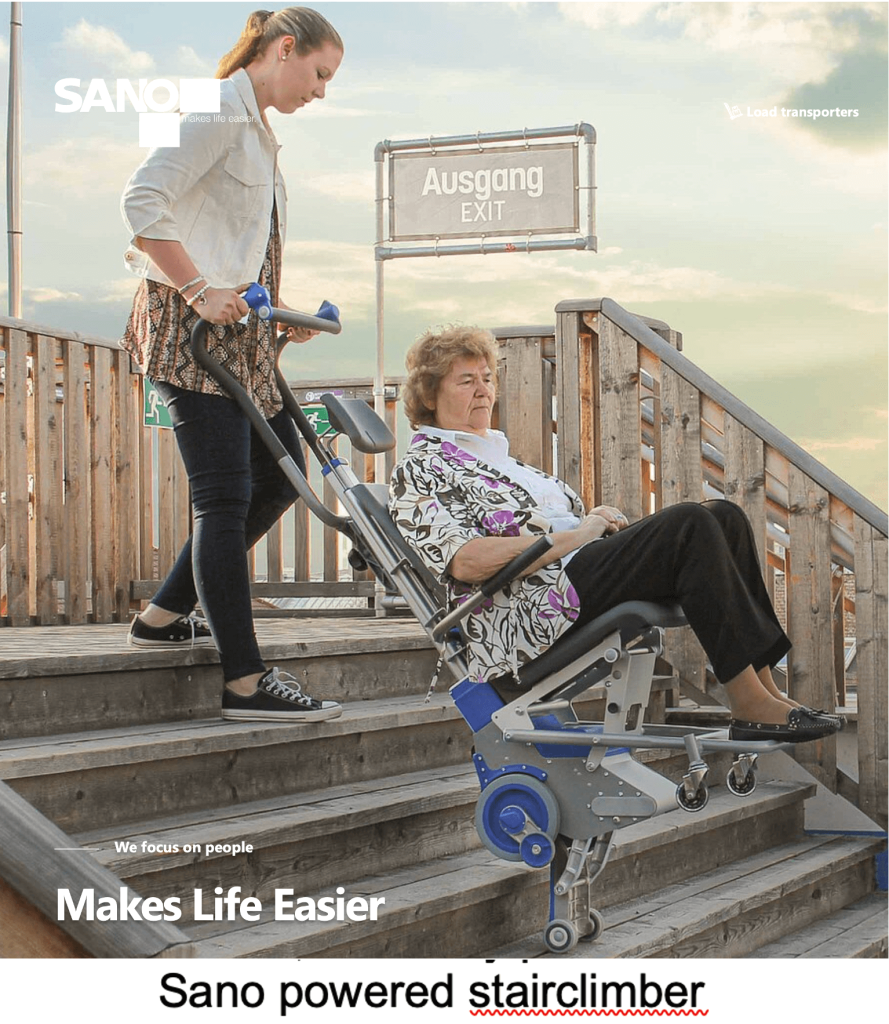
I learned about a powered stairclimber in June 2024. See the photo below. There are numerous models available. Here’s a link to one: https://www.sano-stairclimbers.com/people-carriers/products/liftkar-pt . Since we never had one, I will only present it here for ALS patients and caregivers to consider and evaluate. The model in the photo does not offer forearm or head support.
Vertical platform lifts “VPL”
The builder of the new accessible wing that was added to the back of our house for our son got the “Hercules II 750” vertical platform lift you see in the picture below from AmeriGlide (https://www.ameriglide.com/Vertical-Platform-Lifts.htm) and installed it. (Our model is no longer on that website. Newer models, both indoor and outdoor, superseded it.). I’ve marked the features in the photo. Some have ramps attached for easy entry or exit; ours didn’t. Our unit was missing a cover for the exposed wiring at the front right corner.
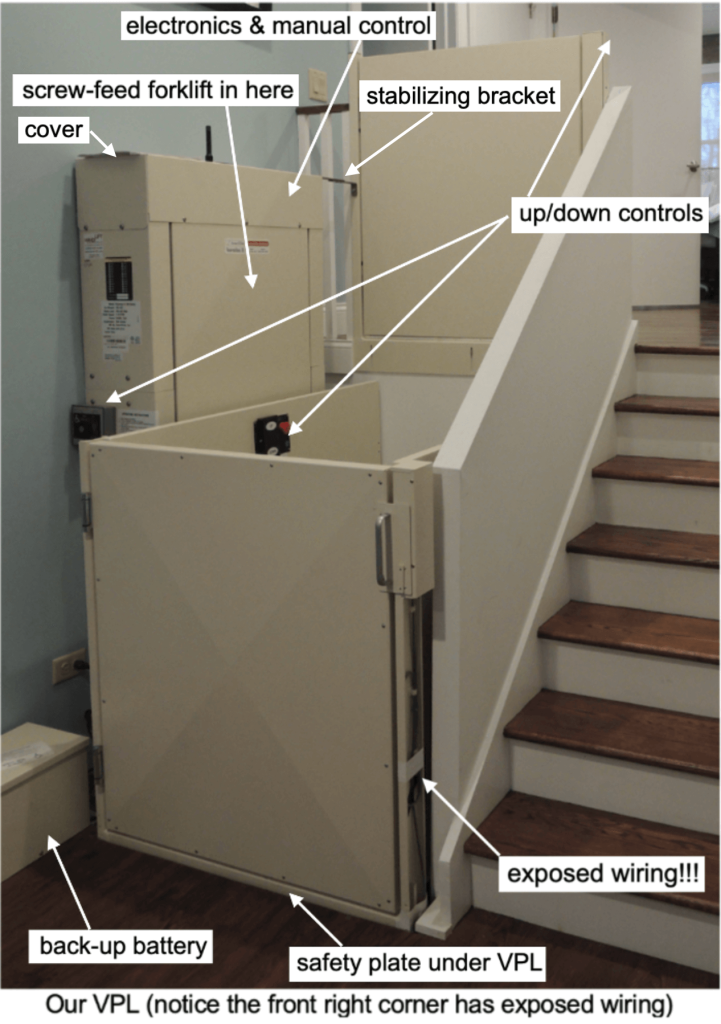
The VPL was rated to lift 750 pounds. It lifted our son (135 pounds) in his power chair (450 pounds) from the ground floor to the main floor. In order to avoid maxing out the VPL, only our son and his chair went up and down in the VPL; my wife and I were able to operate the VPL from either the lower or upper floors because he couldn’t operate the buttons you see in the VPL. There was a safety shutoff plate under the VPL, so if someone or something was under the VPL while it was descending, the plate would touch the person or object and stop. AmeriGlide is a distributor for Harmar, https://www.harmar.com, the latter which I believe actually builds VPLs. The tall box against the wall in the photo contained the circuitry and lifting equipment. The lift is essentially a forklift with a screw mechanism instead of a chain mechanism like real forklifts have. The whole product is flimsy, very noisy and in some cases, stupidly or cheaply designed. Fortunately, I found an elevator service company here in New Jersey (https://handi-lift.com) who sent an “old-timer” who knew this product thoroughly. He serviced it and pointed out potential problems, including flimsy plastic parts that wear out or break. I got a service contract from them, so they still come twice a year to service the VPL, even though our son passed away in October 2021. We have a wheelchair-bound guest who comes occasionally, so I want the VPL in pristine working condition for her.
The builder had problems with the installation. AmeriGlide offered no service: it would not respond to repeated requests from both the builder and me for help. I don’t know if AmeriGlide would have installed the VPL instead of the builder, but I doubt it. I dealt with Harmar. The VPL came with the mysterious cast iron object in the photo below, which neither the builder nor I knew what it was. There was no mention of it in the owner’s manual. Harmar finally told me it was a manual driver, sort-of like a steering wheel that was to be used to raise the VPL if there was a power failure or some other electrical failure.
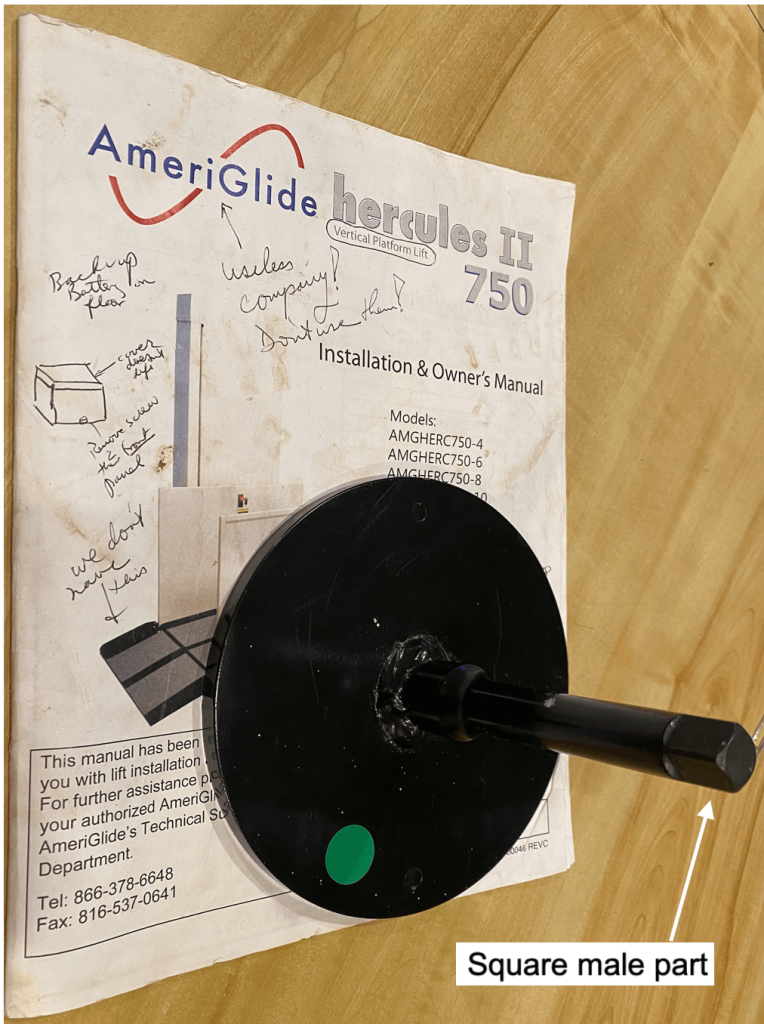
To use it during a power failure would be a nightmare. I would first have to remove the stabilizing bracket and the cover from the large box (in the dark, of course). Then the manual driver’s square male end would have to connect to the hexagonal male part in the mechanism (see photo below), but no adapter was provided. Why didn’t the manufacturer make the two ends compatible?
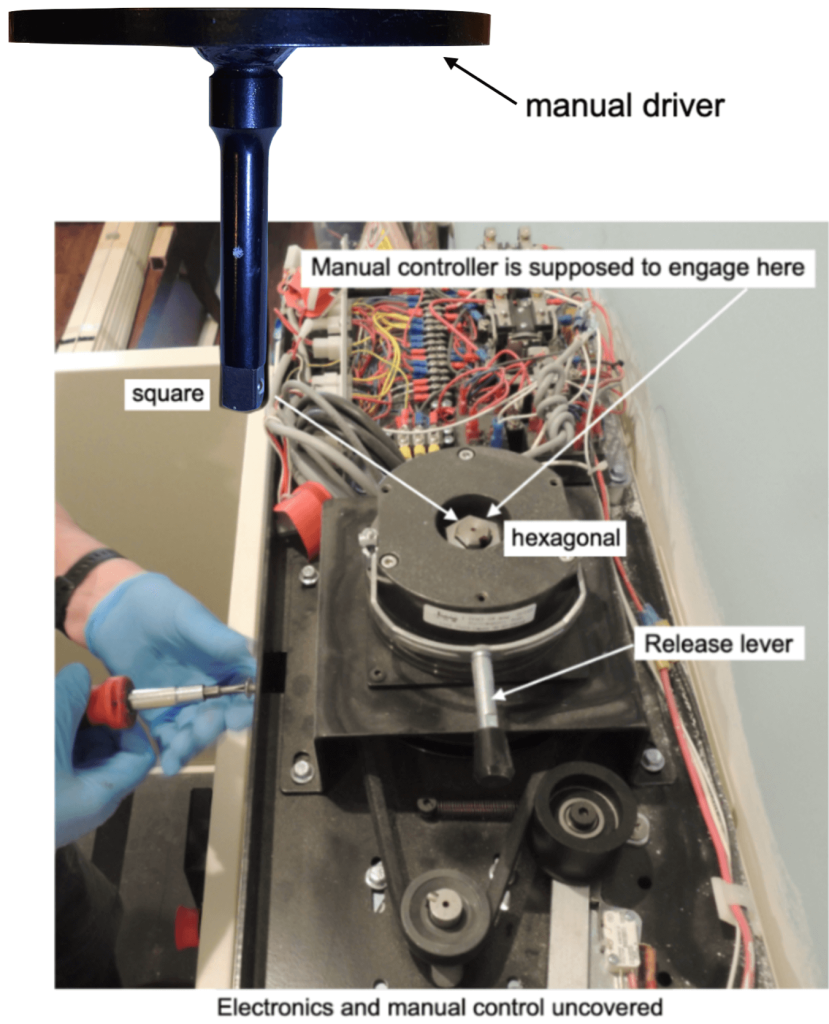
Ascending in the VPL during a power failure
So, to describe how idiotic this was, picture the following hypothetical scenario: My son is in his power chair on the lower floor of the house (see VPL three photos above). There’s a power failure. It’s nighttime. The VPL hallway is dark. Our son needs the VPL to go up to the main floor where his bedroom and bathroom are. I have to find a screwdriver and flashlight in the dark so I can remove the stabilizing bracket before I can remove all the screws holding the cover in place, then I have to remove the cover itself. I would then have to connect the square manual driver in the photo above to the hexagonal nut in the control mechanism. So now I have to find a socket adapter, which I don’t own. I would have to be in the VPL to reach and operate the manual driver. Finally, I would have to connect the manual driver to the control and turn the driver by hand to lift a combined weight of 740 pounds (my son + the chair + me) up to the main floor. Yeah, right.
Descending in the VPL during a power failure
If I had to get our son from the main floor and out of the house, then after removing the bracket and cover, I would lift the release lever you see in the photo below. The weight of our son, his chair, and me would allow the VPL to descend, and I could slow it down by controlling the release lever. Descending would be easier than ascending.
Someone on the Facebook group suggested drilling a hole through the cover directly over the hexagonal hole in the controller so I could just attach a cordless drill with a correctly-sized hexagonal long drive on it and operate the VPL in either direction. I never got to try that before my son passed away, but it was a good idea.
It got worse. The builder then tried to finalize all the building inspections. Our town did not have a licensed elevator inspector on staff, so the builder had to call for a NJ State elevator inspector in the capital, Trenton, 90 miles away to come and inspect the unit. The inspector came and immediately failed the unit because the safety shutoff plate under the unit wasn’t working, then left. The builder had to fix it, then he called the inspector back. Three cheers for the inspector. Inspectors are a pain, but inspectors prevent contractors from getting away with substandard work.
Here’s the NJ link for all you NJ fans of VPLs: https://www.njconsumeraffairs.gov/esc See “Elevator, Escalator, and Moving Walkway Mechanics Licensing Board”. Here’s a link that may help you learn about your responsibilities with a residential elevator: https://mylinkline.com/new-jersey-elevator-code/.
So, the upshot? Before you buy a VPL, make sure you know whether the distributor of the VPL services them, or find out where to get service ahead of time. And find out whether the distributor is reliable. And find out whether elevator inspections are mandatory in your state. Oh yeah, and don’t let a builder install it. Caveat emptor.
Elevators
We knew one couple whose husband had ALS. They had the money and the space to have a real, elegant, enclosed elevator installed to take the husband from the first floor to the second floor. Eat my heart out.
Scooters
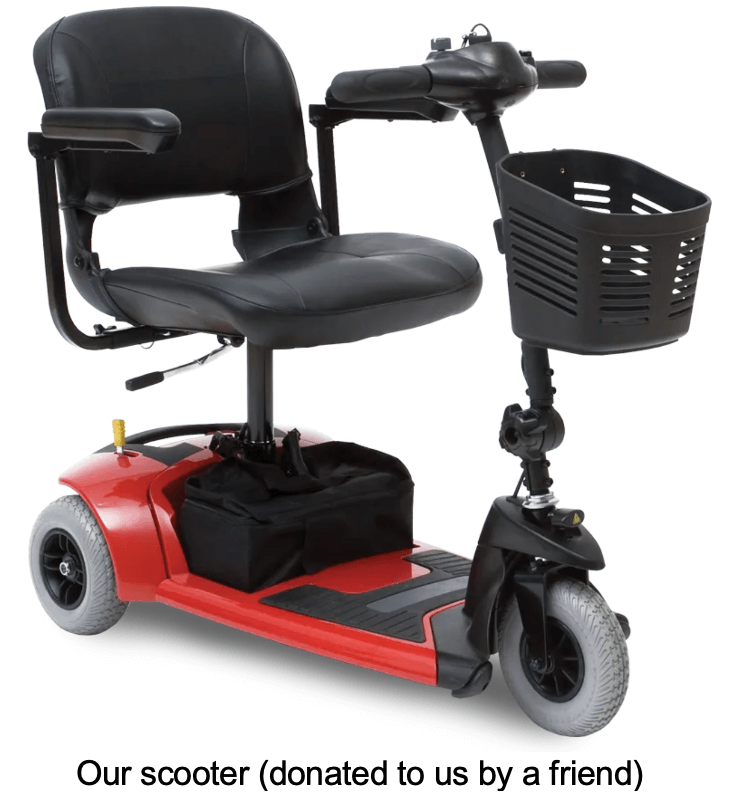
One of our son’s friends gave him an old, but working 3-wheeled scooter called “Golden Companion” very similar to the one in the picture below: https://www.spinlife.com/Golden-Technologies-Companion-3-Wheel-Scooter-3-Wheel-Full-Size-Scooter/spec.cfm?productID=89043. (The one at the link is the newest version of the “Companion”.
Our son only used it once or twice because he was too weak to hold the grips and steer. He also was not able to sit up straight. The battery drained rapidly when he went up a steep hill. Scooters come in 4-wheel versions, too, and some are very expensive. I suggest avoiding these and getting a power chair. It’s another example of a short-term solution to a progressive problem which needs a long-term fix.
Push wheelchairs
If you already have a walker and you’ve fallen, then consider a push wheelchair, or better yet, my recommendation: skip the push wheelchair and get a power chair. Insurance lets you get a new chair (push or power) every 5 years, but check with your own insurer. If you opt for a push wheelchair through insurance, you still would have to wait 5 years before you could get a power wheelchair through them, so go for the powerchair from the getgo. Don’t present any opportunity to fall again. The floor is harder than you think. Corners of tables are sharper than you think.
When our son was still able to walk with forearm braces, he wanted to shave while standing and leaning against his bathroom counter. One day he fell because he lost his balance while leaning too far in or his hand slid off the counter (I wasn’t present). He fell forward and hit his face against the large bathroom mirror, which, thankfully had some kind of shock absorbers behind it so it didn’t break, but then he bounced backward, hit an opened door behind him so hard that the doorknob put a hole in the wall. He then went down and his head hit the floor.
A second time, he had just struggled with his forearm braces to get to the toilet to pee (I wasn’t present in this case, either). While he was peeing, he lost his footing, fell directly backward, ripped a towel rack out of the wall on the way down, and slammed his head against the tiled floor. He was just lying there stunned when we came running in. That was the end of his independent walking.
Remember: Floors are hard. Corners are sharp. Gravity is your enemy.
Folding and/or lightweight power chairs
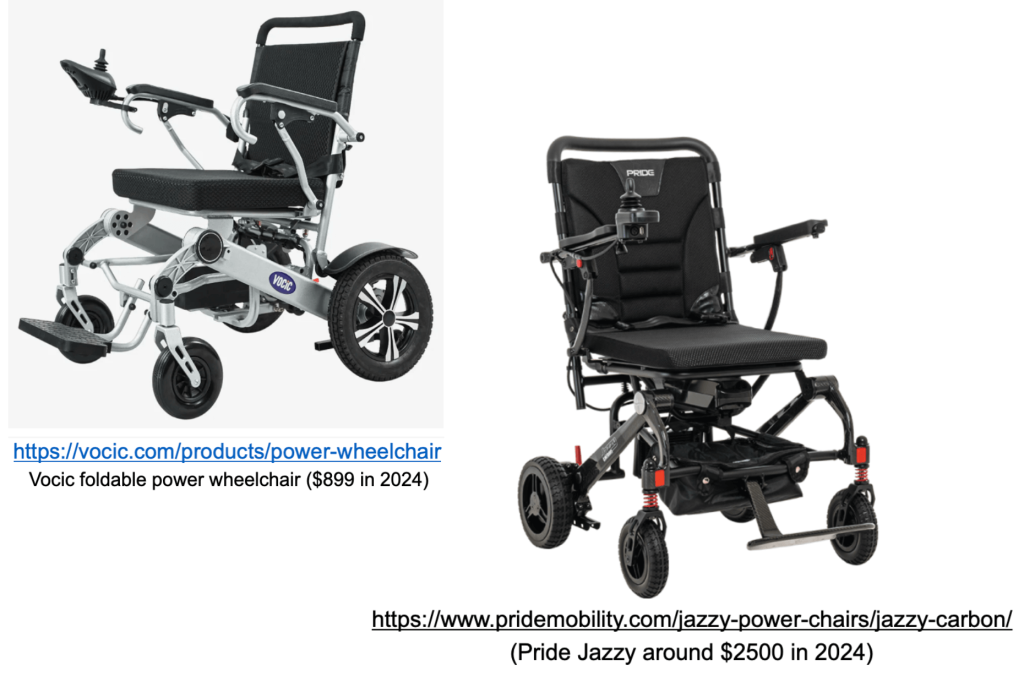
There are lots of new power chairs appearing on the market through vendors and Amazon that are folding and/or lightweight (or lighter weight). Two models are shown below and the prices are very different. Before you buy, consider these issues: What do you want to be able to do in the chair? If it is just for short trips, it’s probably OK. For all-day sitting like our son needed, even his Quantum Edge 3 450-pound power chair quickly became uncomfortable after a short while each day. Both backrests below are flat; how comfortable are they? Do they offer support? If you need a head rest for any reason, can one be attached? Head rests and other major parts for power chairs are brand-specific by design (not universal), so you can’t just buy one and hope it will fit. Also, durable medical equipment vendors (DMEs) probably won’t sell to you without a doctor’s prescription, and then you probably will have to go through a clinic (for instance Kessler Institute in West Orange, NJ like we did), and you will also have to deal with one of those monster DME companies, like NuMotion (I call it No-Motion because they wouldn’t answer my emails or phone calls) or National Seating and Mobility, which provided very good service. I know from experience; I tried to buy a head restraint for our son’s powerchair from a third DME vendor for cash, but they would not sell one to me! They told me that I had to get a prescription first.
But if you buy equipment online, or get it secondhand, but without going through a DME, no DME will ever touch the equipment or service it, because you didn’t get it through them. Can the folding chair recline fully? Are there shock absorbers or spring suspensions for going over rough surfaces? How do you prepare it to go on, or under, a plane? Can softer cushions be added? Can you disengage the motor so it could be it be pushed if the battery dies or do the wheels lock up? Can you change the arm rests to scooped ones to prevent your arms falling off the sides? The foot rests in both chairs below are very narrow; can any different foot rests or separate foot pads be added? What about calf- and foot-restraints? Our son’s feet kept falling off both the outer edges and front edge of his foot rests on his Quantum Edge 3 even though those pads were very wide and long. Can a rear joystick be added for a caregiver? Can mounting hardware be attached to add a cell phone, or water bottle, or a call button, or an eye-gaze device or a ventilator? Where do you get chair service for software updates or mechanical issues?
Power chairs
There are at least three main types of power wheelchair (PWC) – rear-wheel, front-wheel, and mid-wheel drives. A discussion of these three can be found at https://silvercross.com/power-wheelchairs . See pictures below. They all have two larger powered, or driving, wheels. Some have 2 casters, some have 4. Some can be folded. There are many add-ons, depending on the needs of the user. Turning ability is determined by the number of casters and the location of the powered wheels.
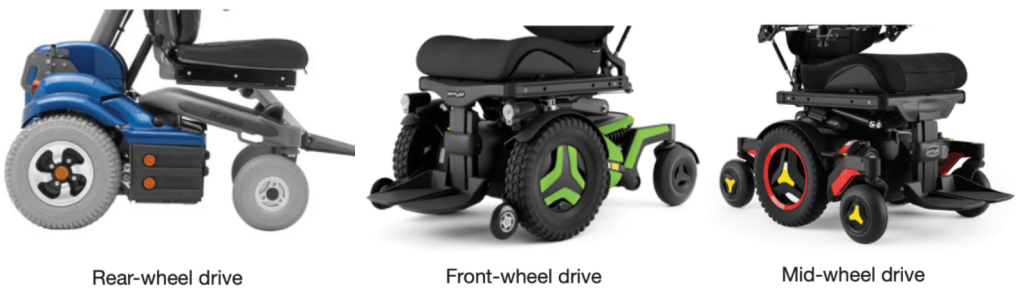
Each design has pros and cons.
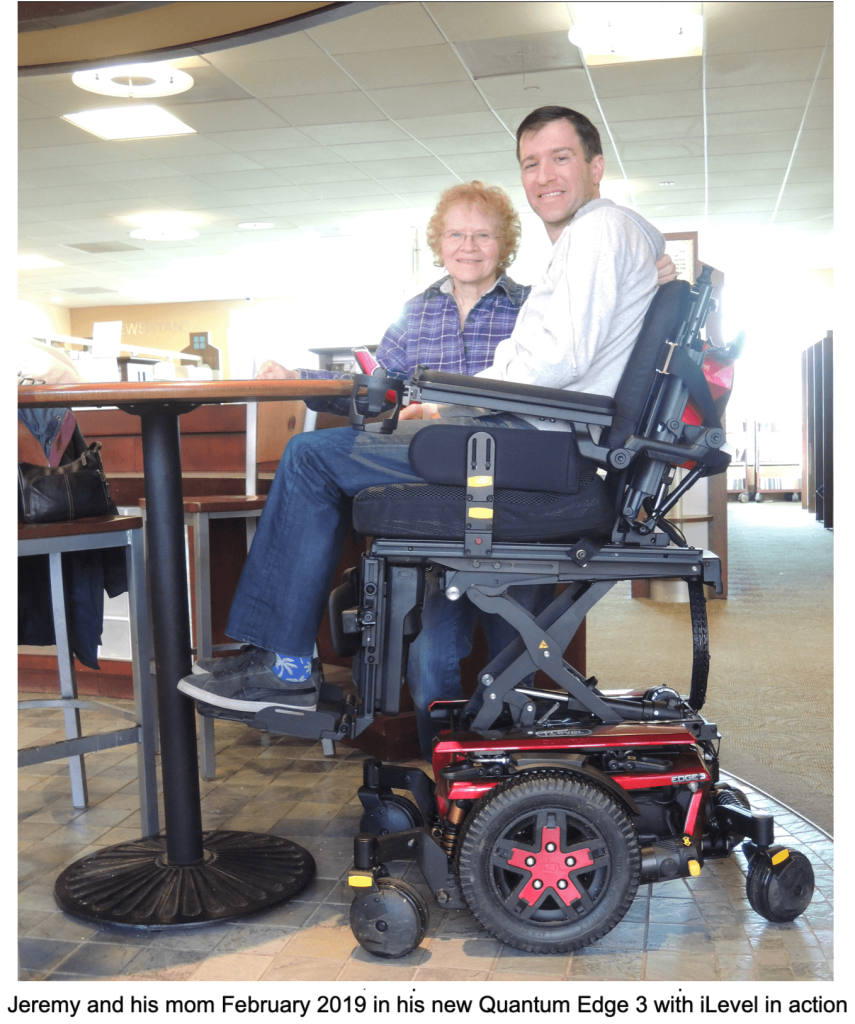
Our son had a Quantum Edge 3, https://www.quantumrehab.com/quantum-power-bases/edge-3.asp, with a mid-wheel drive, like the red one you see above and the actual photo of him in his new power chair below. It cost $29,000 in 2019, and insurance covered all but the $1000 cost of the iLevel rising option, which was not covered. Not bad. It had a joystick mounted at the front end of the right armrest for our son to control, and it also had a caregiver’s joystick in the back for when he could no longer use his hands. The design even allowed the chair to climb onto a 4” – 6” high curb. A wheelchair specialist from Kessler Institute in West Orange, NJ and a specialist from National Seating and Mobility, https://www.nsm-seating.com (NSM), worked with our son to custom-fit it with the necessary attachments. Adjustments were usually done at Kessler and repairs and replacement parts were gotten at NSM. Many times I repaired the chair and made my own adjustments to save time. Most of my home repairs and adjustments only required a set of metric and imperial Allen wrenches, plus screwdrivers.
The rear shock absorber began leaking shortly after he got the chair and it was replaced 5 or 6 times. The manufacturer of the chair got tired of replacing the shocks and even the rear suspension once, so they exchanged his original Quantum Edge for the slightly newer model at no cost to us. Unfortunately, the new model chair was stupidly redesigned from the old one, making the headrest height extremely difficult to adjust or even to remove. They reshaped the railings on the backside of the backrest and also the backrest cushion itself so things that fit on the first model wouldn’t fit on the second one.
The chair was not comfortable because there was very little room between the armrests and our son’s torso. He felt trapped. Also, because of pressure sores along his spine, he needed a vertical valley-shaped pillow behind him to alleviate pain and pressure on the sores. The pillow that came with the chair pushed his butt forward so about 4” of the undersides of his legs behind his kneecaps were not supported. It was like sitting on the edge of a chair all day. We couldn’t do anything about that. We tried adding (not replacing) the chair’s own backrest cushion with a vertical valley-shaped pillow, but the two pillows together pushed our son too far forward.
Sometimes if we forgot to lower the iLevel all the way, our son’s wheelchair couldn’t go up our van’s ramp because the driving wheels were off the ground and spinning where the ramp met the pavement. The iLevel was also programmed so that the chair would not move if the elevator was not at least mostly down (for safety reasons).
Recommendations for a powerchair
Try to get as many of the following features as possible ahead of time:
Mid-wheel drive with 2 front and 2 rear casters (can turn on a dime, instead of going in a circle), but reversing directions while moving will cause steering off-target because of the casters. I explained this problem in detail in this website at the link: https://guidetoals.com/transportation-and-als/.
Torso supports to stop you from tilting to the left or right.
Lateral thigh restraints to prevent your legs from falling off the sides of the foot pads.
Valley-shaped arm rests with inner and outer forearm restraints to stop your arms from falling off the arm rests. Don’t accept the skinny flat arm rests.
Vertical valley-shaped back-support cushion to avoid pressure on your spine.
Front/back head restraints and Lateral head supports in anticipation of head drop. I covered head supports in this website at the link: https://guidetoals.com/head-and-neck-support/.
Full access to programmable controller so you don’t have to call a technician to make changes to performance. We could not make adjustments to the control parameters (like cruising speed). Either a service guy had to come to the house or I had to take the chair to them.
Built-in stander (if possible) to stand you up on the foot rests.
Calf supports to help keep your feet on the foot pads
Extra long seat to support the whole underside of your thighs (otherwise it’s like you’re always sitting on the edge of your seat)
Front and rear joystick controllers are very important. You should be able to place the rear controller on either the left side or the right side of the back rest to allow both left- and right-handed caregivers to drive it. Walking side-by-side with the wheelchair user is easier than walking behind.
Ventilated seat to avoid sweating.
Vendor should show you what mounts and mounting hardware are compatible with the brand chair you chose to allow you to carry equipment such as an aspirator, ventilator, cough-assist, and nebulizer on the back of the chair if necessary.
Learn what mounts are available to add equipment like a cellphone holder, laptop holder, water bottle, etc., on the frame of the chair. We found no mounts satisfactory; they all sagged while driving in the van or on bumpy sidewalks. Some frames were monsters and heavy.
Possible forearm extensions to support the hands at a comfortable angle, not just the forearms.
Get the longest, widest foot rests possible because the patient’s feet will fall off the sides or front edge of the foot rests like always happened to our son. Our son’s feet sometimes became stuck between the left- and right foot rests.
Elevator function (example: iLevel to raise you up). Here’s a link that explains about insurance coverage for the iLevel: https://www.quantumrehab.com/ilevel-power-chairs/ilevel-frequently-asked-questions.asp.
Make sure you can remove and adjust the headrest easily. The headrest on our son’s second Quantum 3 was extremely difficult to adjust or remove.
The seat should tilt forward. It should tilt backward until it lies flat. The patient should be able to lie flat in the chair (backrest tilts down and lower-leg supports tilt up).
Restraint straps or brackets for the torso.
The vendor should show you how to remove the controllers, the cushions, disconnect the battery, and to recline the back completely if you plan to fly.
The vendor should show you how to make adjustments (armrest positions: pivot in or out, shorten or lengthen, angled up and down) and should provide you with the correct tools or at least give you a list of the correct tools to make your own adjustments.
Be wary of getting an EZLock device as an add-on: we found it difficult to use in our side-entry van and I think either the EZLock installers damaged the underside, or we did when the chair got hung up on the EZLock plate in our van. See the EZLock discussion in this website at: https://guidetoals.com/transportation-and-als/.
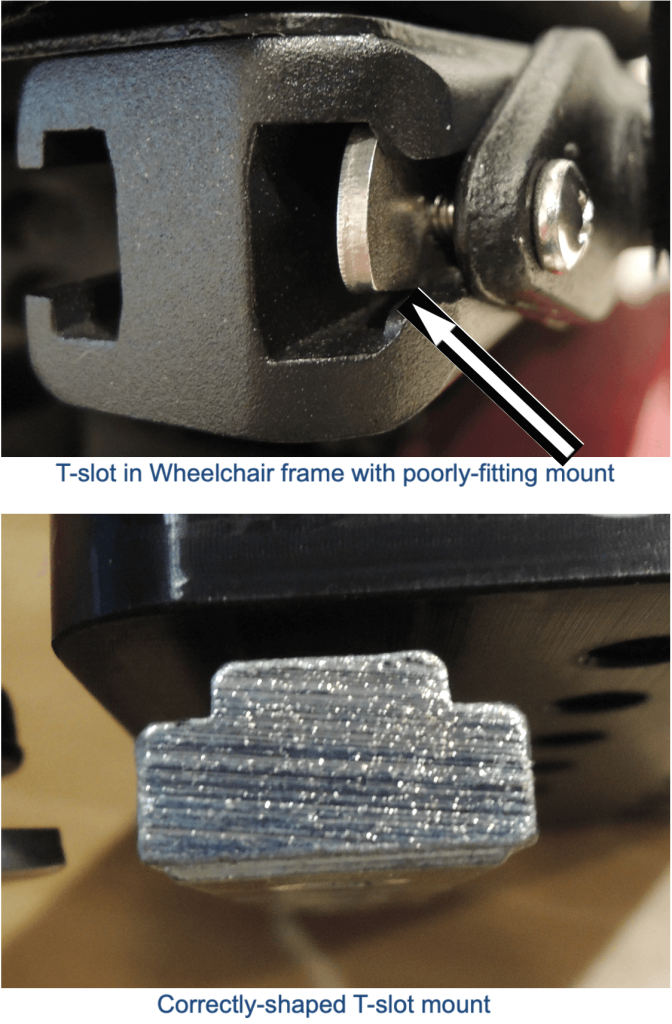
One of the very convenient features was the T-shaped slotted rails on the left and right sides of the seat frame and backrest. These slots allowed me to attach numerous things we bought as his needs changed. If you do buy attachments, beware that some vendors claim that their products fit in those rails, but they don’t. See photos below. We had purchased a wheelchair add-on from one vendor who claimed its mounts fit the T-slots. When I sent the vendor pictures of how poorly their mounts engaged the T-slots, the vendor actually machined some different mounts for me. The vendor knew the brand of wheelchair our son had, so he was able to get the correct measurements of the T-slots and then machine the correct mounts.
If you are, or have a caretaker who is handy with tools, it will make your life with the wheelchair much easier: I was always making adjustments to our son’s arm- and foot-rests (angles, positions, lengths, etc), otherwise, we would have had to take him and his chair to the wheelchair place every time.
Our son’s chair had one valley-shaped arm rest. It was comfortable, but the greater width of the armrest sometimes rubbed against our son’s torso. It was more confining because it was wider. Our son kept leaning over towards it (for reasons unknown) so the inner thin edge of the channel was always cutting into his ribs. The valley-shaped arm rest was much wider than the original armrest. The extra width prevented me from attaching a side (torso) support to the chair’s back because there was no space. I eventually found enough spare parts to jerry-rig a padded torso support to the underside of the armrest itself and it held him upright.
Operating a powerchair with an attendant (rear) control
Joystick controllers for the power chair
This discussion is based on the Quantum Edge 3 our son had, but I’m sure most, if not all, of this applies to other chairs. His power chair had two joysticks, or joystick controls (see photo and video link below the screen). Note: The photo and screen shots from the video were obtained from YouTube, which I found by entering the search phrase “attendant controlled electric power wheelchair” to find this video.” It wasn’t easy to find. The video is on the “Wheelchair Skills Program” website at https://www.youtube.com/@WheelchairSkillsProgram/playlists. The video I’m discussing had the title seen in the screen shot directly below:

The URL for this video itself is: https://www.youtube.com/watch?v=1l2SD-dXGOI
Our son’s own control was mounted on the forward end of the right armrest and the attendant control was mounted on the righthand side behind the backrest, like in the photo below. You can get variously-shaped knobs and handles for the front controller, based on the patient’s abilities. I only learned the phrase “attendant control” while searching for information on the web. The attendant control was removable and remountable, which we, his caregivers, had to use after our son lost all ability to use his own hands. I moved our son’s attendant controller to the left-hand side of the backrest, for reasons I’ll explain later. The attendant control allowed the caregiver to switch between the front and rear controls, drive the wheelchair, and do everything else the front control could do. The pictures below are from the only decent YouTube video (cited above) I could find that explained the attendant control.
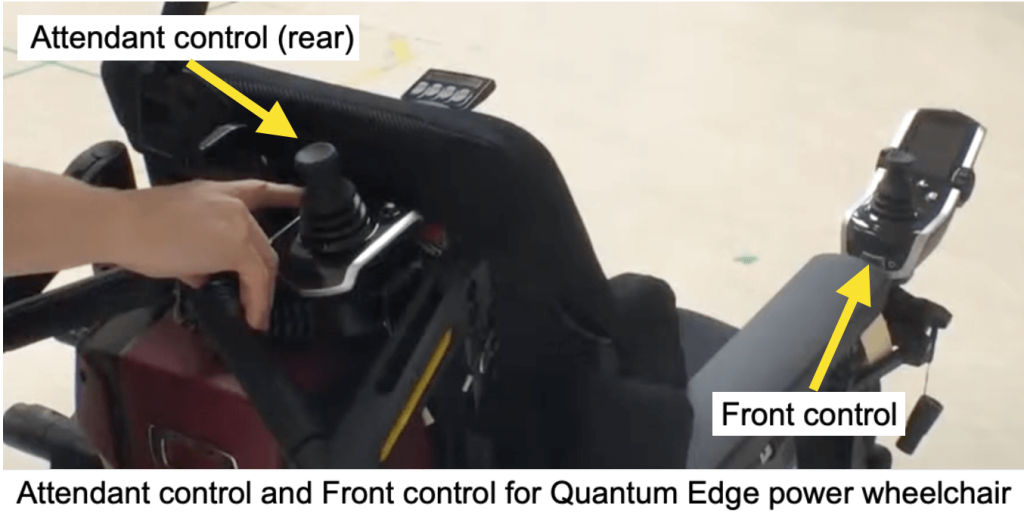
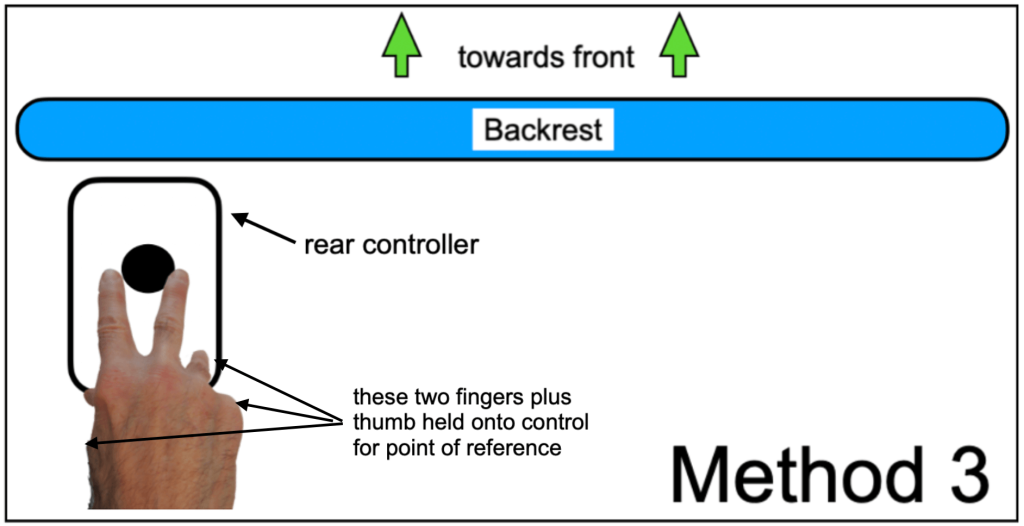
We had at least 4 different ways of using the attendant control. By “reference point” in the discussion below, I mean that my controlling hand was not touching the controller at all, so it was difficult to know which way my hand was pointed unless I kept looking at it. Each of these methods had pros and cons:
Method 1 (below): Caregiver’s whole hand was holding the knob of the joystick. (See drawing below).
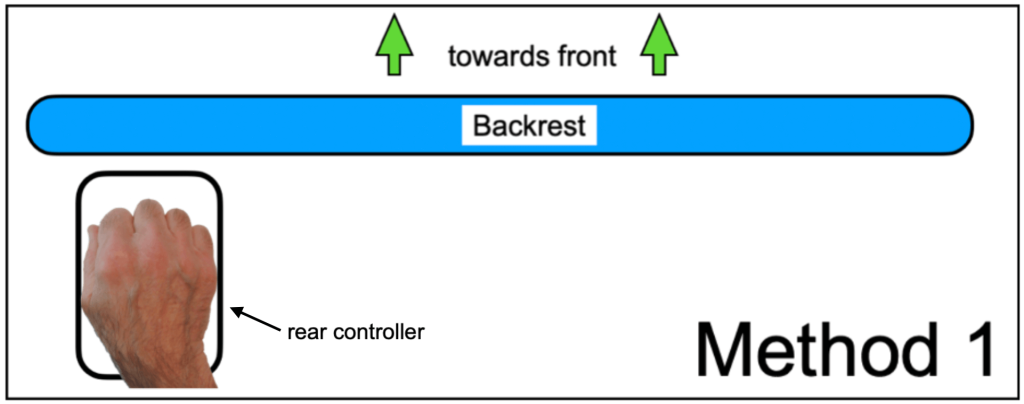
Control was difficult because the caregiver’s hand was resting completely on the control knob and there was no reference point while driving, especially while turning. I also didn’t know whether my hand was pointed forward while on the knob.
Method 2 (below): Caregiver’s middle-, ring-, and pinky fingers and the outer edge of the palm were gently resting on the body of the control with thumb and forefinger on the joystick (as in the video). (See both the photo from the video and the drawing below). I never used this method, but since part of the hand was resting on the body of the control, there was a reference point while driving, and especially while turning because the hand didn’t turn with respect to the control.
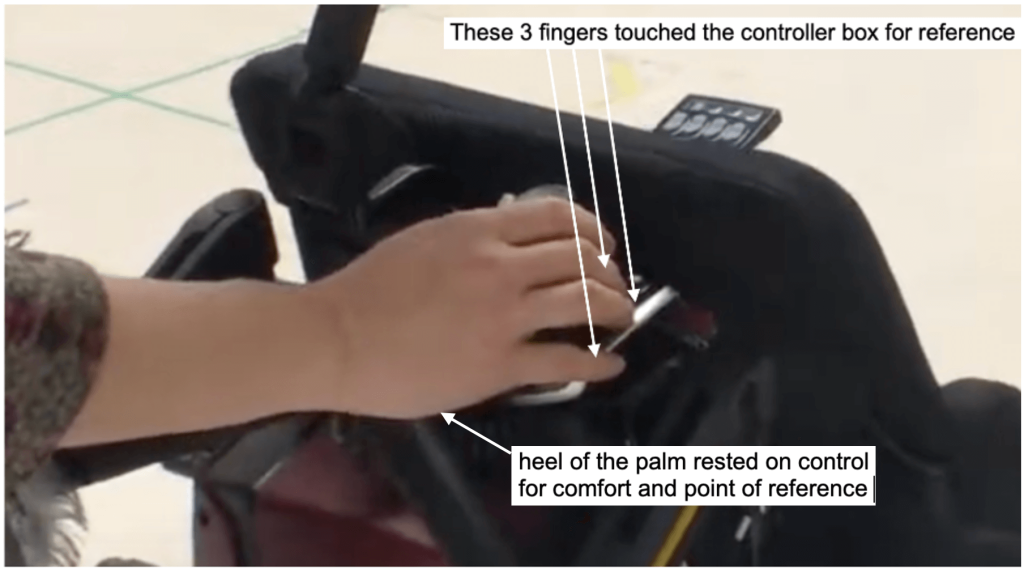
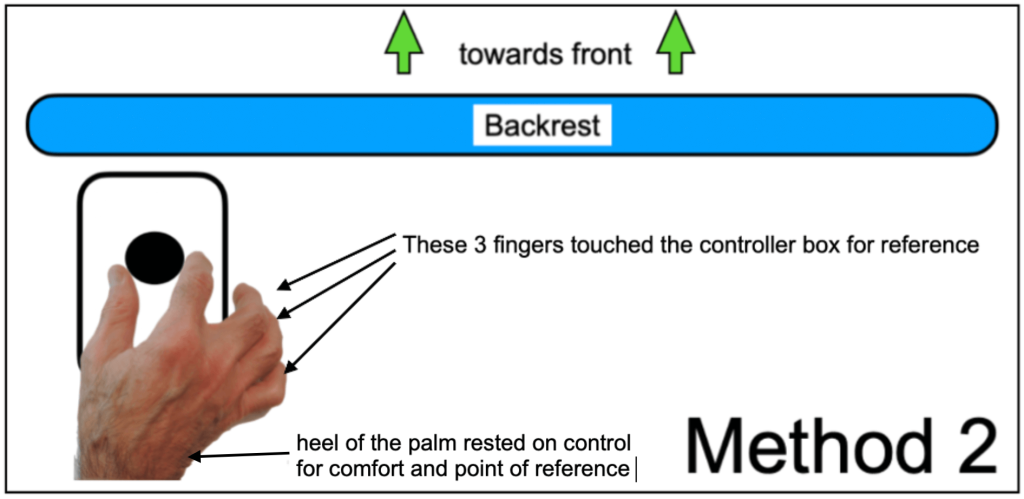
Method 3 (below): Caregiver’s index finger and middle finger controlled the joystick while the thumb, ring finger and pinky held onto the body of the control and the heel of the palm sometimes rested on the control (the way I did it). See drawing below. This method gave me a point of reference while driving and turning, plus fairly easy steering. Backing up was a little difficult because I had to pull the knob backwards while keeping contact with the controller.
Method 4 (below): Caregiver removed the attendant control from the mount, held it in his or her hand, and used the other hand to control the joystick using one of the methods above. With this method, the caregiver had to use both hands to drive the wheelchair and had no free hand to do other things.
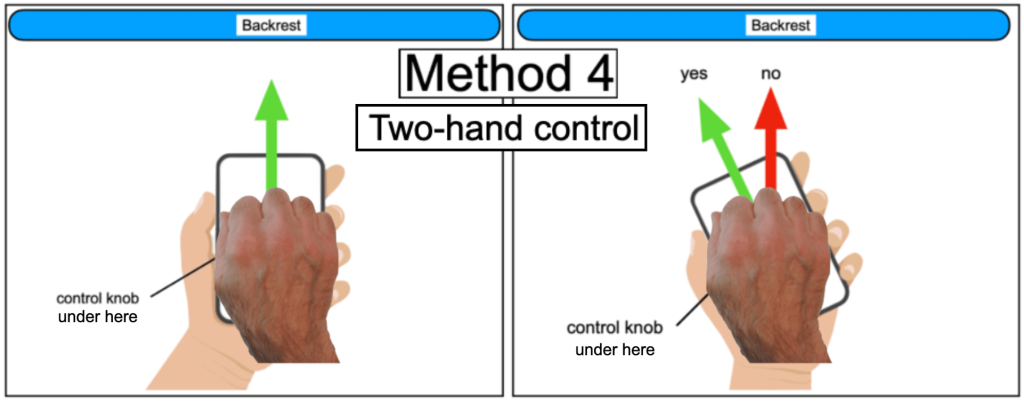
I didn’t see any advantage to method 4 and it only made operation of the wheelchair MORE difficult than the other 3 ways. The first problem is that this method requires TWO hands: one to hold the controller and one to operate. The drawing on the left above shows the control body being held “square” to the backrest (which I found difficult to maintain) so when the control knob is pushed forward, the controller is truly pointing in the direction you want to go. The drawing on the right above shows the control body being held much more comfortably, but at an angle to the backrest. The problem now is that the caregiver loses spatial orientation and a point of reference: to go forward, do you push the knob as the green arrow indicates, or as the red arrow indicates? I tried this and kept getting confused. The answer: the green arrow is correct even though the control is not aimed forward, so you will be pushing the knob to the left even though you want to go forward. I also found the chair wandering left and right because my hands were not anchored to the chair.
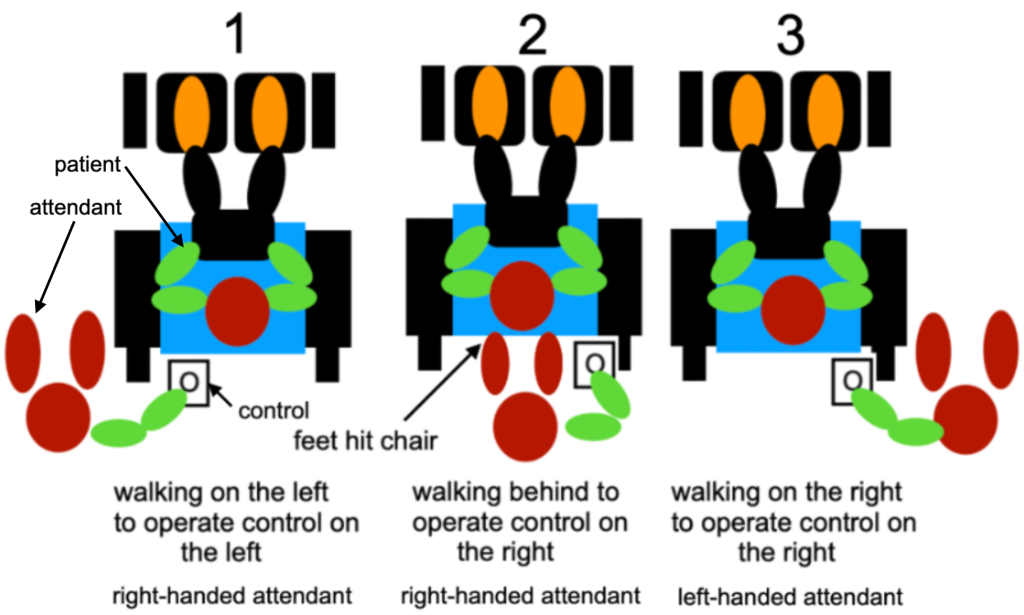
Our son’s powerchair was delivered to us with the attendant control mounted behind the backrest on the righthand side, like the cartoon #2 below (pardon my cartooning ability) and just like in the video above. Since I was right-handed, I found it difficult to walk behind the chair and operate the control because I kept stubbing my feet on the back of the chair. I eventually remounted the attendant control on the lefthand side like cartoon #1 below so I could walk on my son’s left side of the powerchair while I was driving it. It was also friendlier and easier to talk to our son when I was on his left side. For left-handed people, cartoon #3 is a better position for both the attendant and the control. However, it was not simple to move the control from the right side to the left side because the chair came with only one mount, which needed tools to do the switch.
Many ALS victims and caregivers have asked on the Facebook group “ALS – Patient and Caregiver tips for every day living” whether there are any controlling devices for the wheelchair, like iPad or cellphones, and also devices that don’t require the hands at all, like eye-gaze devices. I don’t have any experience with these, but because ALS is a progressive disease, any device that initially might work will probably eventually not be operable by the ALS victim. Our son had head drop late in his ALS so he couldn’t even look at the screen easily, and no matter what mounting devices we tried for his cellphone, iPad, and laptop, there was too much vibration while in motion, whether driving the chair for him, or while going somewhere in our van, so he could not have operated the wheelchair anyway.
An interesting personal anecdote:
After our son passed away, I began volunteering to work with special needs school children at Lifetown: https://www.lifetown.com. One student who came to Lifetown was using the same brand and model power wheelchair that our son had, so I knew it thoroughly. The student was with his teacher who was operating the wheelchair exactly like I described in #4 above. She was having the same navigating issues I had. Since she was righthanded, I suggested she have the attendant control mounted on the left like in cartoon # 1. She didn’t even know the control could be moved. I then showed her how I controlled and operated the wheelchair with one hand using method 3 as described above. She was flabbergasted.
Exoskeleton
A Facebook post that appeared around 12/15/2022 gave a link to a website that has since been deleted but which had a number of exoskeletons for sale. The person who posted about this was hoping or suggesting it could be worn by ALS victims. He was slightly annoyed when I told him the post was irrelevant to ALS so he wrote this:
“So something that enhances movement/strength has nothing to do with ALS? Maybe not directly, but imagine if it could be applied for our use. Hell, imagination is the only thing we have.”
I responded: “My son who died from ALS could not have used that. He was just like a rag doll.”
He replied: “Condolences on your loss, but those of us still here can hope something can make our lives better. It very well could be cybernetics.”
I responded: “I think that the robotic invention would be great for someone who is incapacitated and not progressing, but for such a horribly progressive disease like ALS, I still feel it would be useless. Our son got an Evolv Stander (sort-of related to the robotic devise in that it stood him up) very late in his diagnosis. He got it maybe 6 months before he passed away. It was the first time he had stood up (although not completely) in 3 or more years. I hadn’t seen him smile like that since he had gotten sick, but he was in pain and he could only tolerate it for about 30 minutes and then we had to check his blood pressure to make sure there was no stress and had to get him out of it. Maybe this robotic device would be OK for someone with very slowly progressing ALS [or a non-progressing disease], so there would be an improved quality of life there, but as the ALS worsens the robot probably would be unusable. My son would not have benefitted from it. My son also had head drop from his ALS, so any incorrect motion in the robot would choke him. This is like that other “interim” remedy: the self-feeding device that I’ve seen: the patient has a compartmentalized dish with food and a robotic spoon scoops some food up and places it in the person’s mouth. For an ALS victim, that would be a great interim tool until gagging and choking and the inability to eat and drink set in, then the feeding device would be useless. The long-term solution would be as soon as any difficulty arose to skip the robotic feeding and to get a feeding tube.”
